
The Importance of a Well-Documented Private Collection: Part 3, Software
The Importance of a Well-Documented Private Collection: Part 3
The last two weeks we’ve discussed the importance of a well-documented private collection, and this week we’re going to dive into some ways to keep all of that information with your items. Although this “can” be done with paper, pencil and a filing cabinet, I strongly recommend you go the digital route. I know we all love our historic things, but record-keeping should definitely be in a 21st century style.
Excel (or Google Sheets)
This is probably the simplest way to do this. Create an Excel sheet with fields for the item, purchase date, cost, and purchase information. I would also recommend including where you are keeping the item if possible, so that it is easy to locate if you have a large number of items. Here is an example of what that might look like:

While this technically works on a basic level, do you notice any issues with it? For example, how descriptive can I be about the item in that short Excel line? Would it be easier to have a photograph of the item tied in with this information? Especially when you have several tintypes of Union cavalry soldiers with carbines? This brings me to my second option.
Use a Program like CatalogIt or ReCollector
There are programs designed for this sort of thing, and I have featured them both in the past. Both CatalogIt and ReCollector allow you the space to input all of the information above, and then some. Here is an example of a catalog record using the CatalogIt software. Notice all of the information that this software tracks for each item.
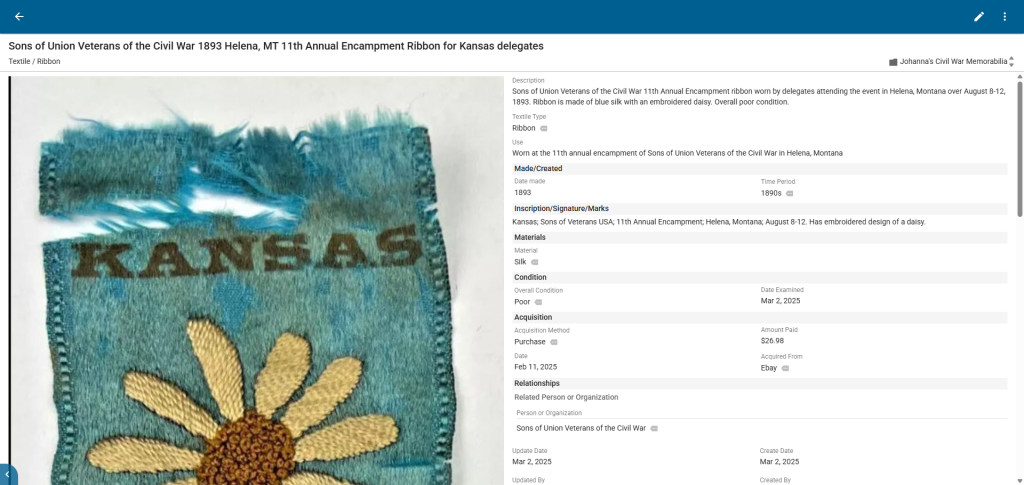
This photo shows you what it looks like on the backend for inputting information and what sorts of fields of information it tracks.
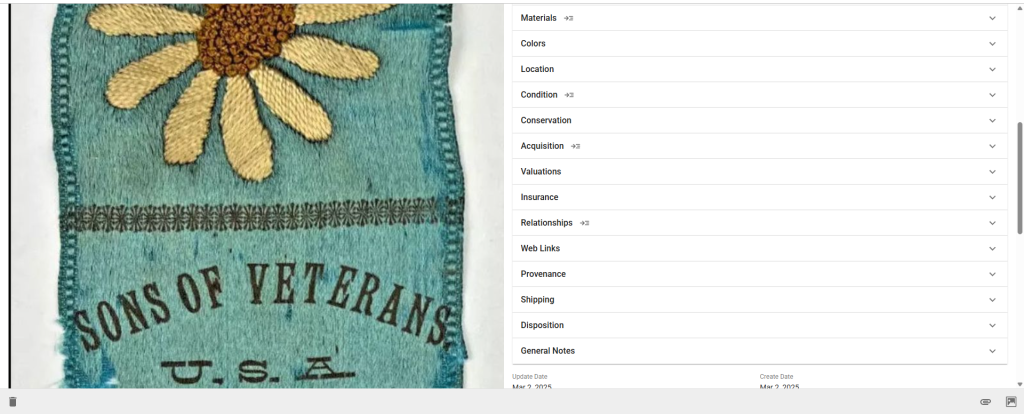
This may look like a lot or seem intimidating, but it really isn’t tough at all. Once you create your first catalog record, it starts to move very quickly. Plus, you can always go back and add more information.
Pros and Cons
Obviously, going the Excel route is simple and something that most folks are already familiar with. However, it is extremely limited and would be cumbersome to use to add a large amount of information to. Whereas CatalogIt is new software so it does have a learning curve, but the value in the type of information it can track far outweighs that learning curve. And if the amount of options for information to be added on CatalogIt seems overwhelming, you do not have to fill in each available box, but the space is there for you to if you want to. Both give you search functionality which far outweighs the “historic” paper and filing cabinet method.
As we discussed in the beginning, the point of this is to keep track of all of your collection information. It’s far too much information to just be rattling around in your head. It needs to be written down, and it should be done in a way that you can actually put everything down that you need to. On top of that, it should be done in a format that the information can easily be passed on to others or accessed by others in the event that your family or loved ones are trying to figure out your collection for resale purposes. In addition, should you decide to donate your collection, this will offer the museum a whole wealth of information on your collection so that they are not starting from scratch. Having worked in museums for nearly two decades, you would be surprised at the amount of information that can be lost when an item is donated by someone who doesn’t really know what it was. This kind of information is absolutely crucial. Remember, context is everything and this is how we keep the context with our collection.
Now that we’ve reached the end of this series, what will you do? Do you already have a system in place that tracks all of this information? Will you start one?
